

 Natalie
If you’re wondering how does Skyscanner work, and how you can use it to find cheap flights, then you’re in the right place! I’ve put together a Skyscanner ‘how to’ guide to help you to make the most of their tools, so you can hunt out the best prices for your family holidays. Planning a family holiday can be a daunting task, especially when you’re trying to stick to a budget. Flights can be one of the most expensive parts of your trip but, with a little know-how, you can use Skyscanner to find the best deals and make your travel plans as affordable as possible. I hope my Skyscanner Guide will help you to save money, so here’s how to hunt out cheap flights for your next family adventure.
What is Skyscanner?
Skyscanner is a brilliant travel search engine that allows you to compare flight prices from hundreds of airlines and travel agents. It’s a one-stop shop for finding the cheapest flights, but it doesn’t stop there – you can also book hotels, car rentals, and even explore destinations if you’re flexible about where to go.

Why use Skyscanner – how does it work?
Skyscanner searches a vast number of airlines and travel websites to give you a comprehensive view of flight options, often finding deals that other sites miss. Skyscanner flights aren’t actually cheaper, but because they compare such a wide range of airlines it’s easy to find a cheap deal. There are lots of flexible search options too – you can search by entire months, find the cheapest destinations, and set up price alerts to monitor fares over time. (I’ll explain more about these features below.) And, the best thing about using the Skyscanner service is that they make their money from the flight providers – so it doesn’t cost you a penny – there are no hidden fees or extra charges added at checkout.
My step-by-step guide – here’s how to use Skyscanner to find cheap flights:
1. Set up your search
- Enter Your Departure and Destination: Start by entering your departure and destination cities. If you’re flexible, you can use the “Everywhere” option to explore the cheapest destinations from your departure point.
- Choose Your Dates: If your travel dates are flexible, use the “Whole Month” search feature to see prices for every day of the month. This can significantly increase your chances of finding a bargain.
- Number of Passengers: Don’t forget to update the number of passengers to ensure the prices reflect the actual cost for your family.
- Flight Options: Select ‘One Way’ or “Return’, and if you want to do some city hopping select the ‘Multi-City’ option.

2. Understand the results page
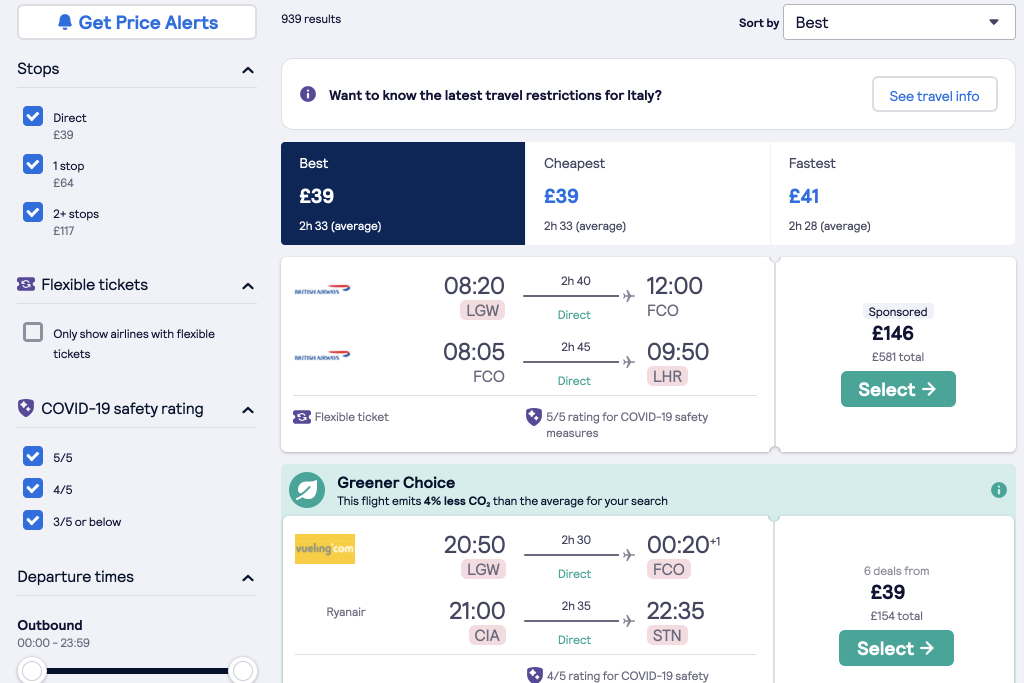
- Filter Your Results: Once you’ve entered your search criteria, you’ll be presented with a list of flights. Use the filters on the left-hand side to narrow down your results by price, duration, number of stops, and more.
- Sort Options: You can sort the results by “Best”, “Cheapest” or “Fastest”. Typically, the “Best” option balances cost and flight times / duration, but if you’re really frugal sort by your results by the “Cheapest” option to see the absolute lowest fares. Choosing a less popular flight time can be a good way to save some extra money too.
3. Use the calendar and chart view
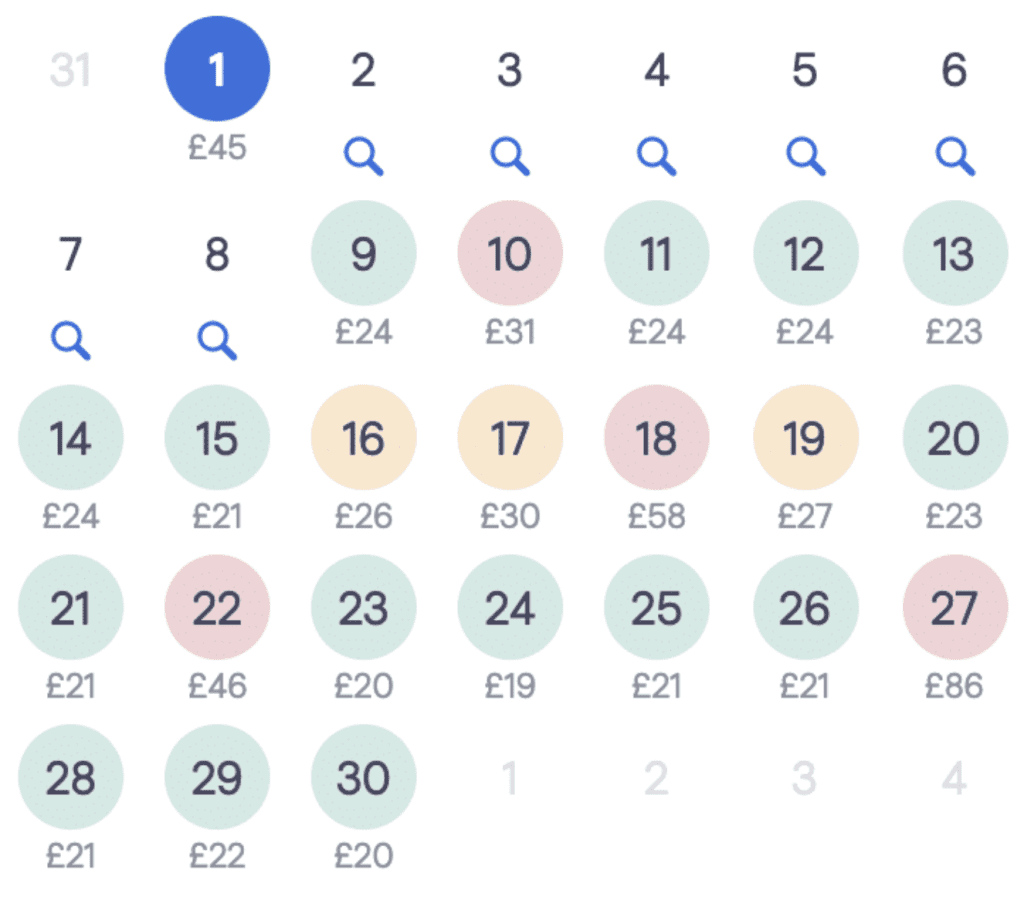
- Calendar View: The calendar view shows prices for each day of your chosen month. Green indicates the cheapest days, yellow for mid-range, and red for the most expensive. If you’re booking your accommodation through a company like Eurocamp, you’ll be able to choose your travel dates and durations (as there are no set check in / check out days) so book your stay around the cheapest flights.
- Chart View: If you prefer a visual representation, the chart view displays prices in a bar graph, making it easy to spot the cheapest travel days.
4. Set up price alerts
- Create an Alert: If you’re not ready to book immediately, set up a price alert. Skyscanner will email you when the price for your chosen flight changes. This is a fantastic way to track fares and book when they drop.
- Monitor Multiple Routes: You can set up multiple alerts for different routes or dates, allowing you to stay flexible and choose the best deal.
5. Explore the “Everywhere” feature
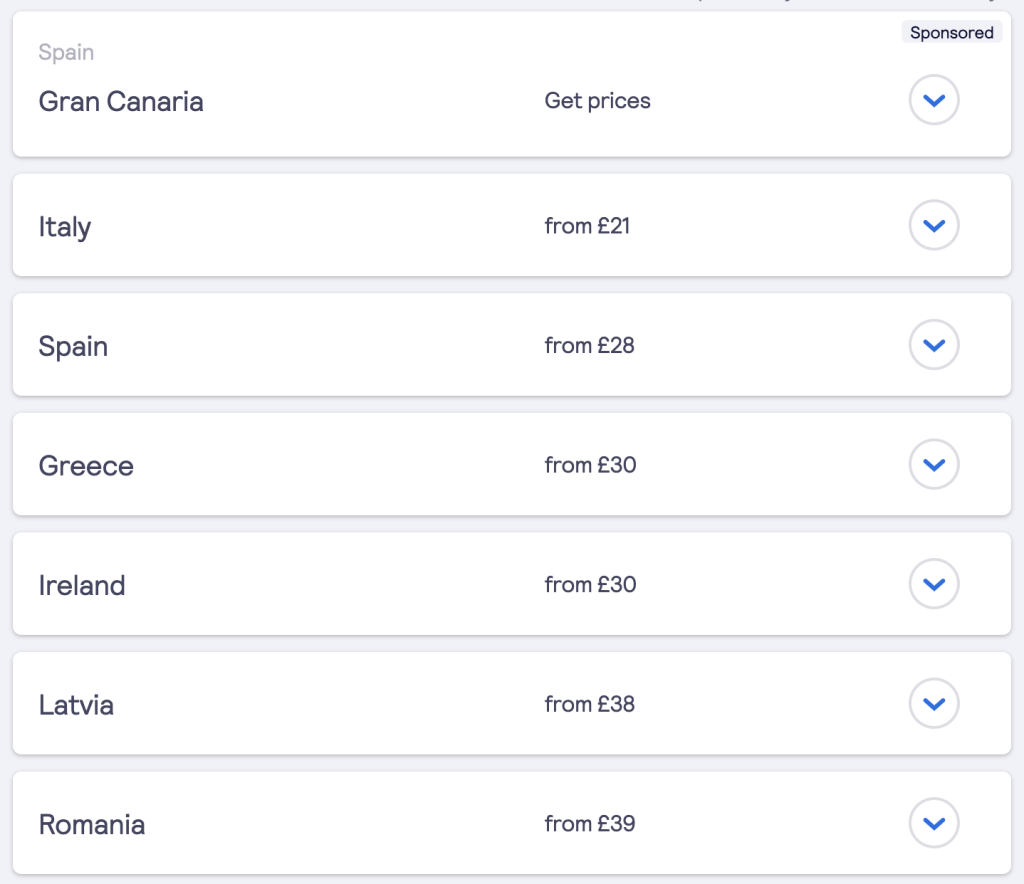
- Flexible Destinations: If you’re open to adventure, use the “Everywhere” search option. Enter your departure city and select “Everywhere” as your destination. Skyscanner will show you a list of destinations sorted by price which is perfect for spontaneous family getaways. If you’re happy to travel anywhere, Skyscanner can be a great way to find cheap flights – flexibility will always save you money.
Tips and tricks to get the best Skyscanner flight deals:
1. Be flexible with dates
Flight prices can vary drastically depending on the day of the week, time of year and even the time of day. If possible, avoid peak travel times like school holidays, weekends and public holidays. Flying mid-week often results in the best deals.
2. Use the “Cheapest Month” feature
If your travel dates are entirely flexible, use Skyscanner’s “Cheapest Month” feature. This option shows you the cheapest month to fly to your chosen destination, potentially saving you hundreds on airfare.

3. Book in advance (but not too far ahead)
If you’re wondering when’s the best time to book cheap Skyscanner flights – it looks like the best deals are generally available when you book your flights several months in advance. However, don’t book too early – many airlines offer sales around 3-6 months before departure, so keep an eye on prices during this window. Very last-minute bookings can be a good way to save money too.
4. Use ‘Incognito Mode’
When searching for flights, use your browser’s incognito mode or private browsing feature. This prevents websites from tracking your searches with cookies and potentially raising prices when they notice repeated searches for the same route.
5. Consider nearby airports
Check if there are alternative airports near your departure or destination city. Sometimes flying into a nearby airport can be significantly cheaper, even when you factor in the cost of transport to your final destination.
6. Don’t forget about stopovers
While direct flights are often the most convenient, booking a Skyscanner flight with a stopover can sometimes save you a lot of money. If your family is up for a bit of adventure, consider a longer layover in a city you’d like to explore, this could be a great way to see a new city along the way!

7. Check baggage policies
Before booking, always check the airline’s baggage policies, especially if you’re flying with a low-cost carrier. Some of the cheapest fares don’t include checked baggage, and adding it later can be expensive. Factor this in to the total cost to avoid surprises – even low cost flights might not actually be the cheapest, when the extras are added on, so make sure you check it all first.
Booking and beyond
Once you’ve found the perfect flight, Skyscanner will direct you to the airline or travel agent’s website to complete your booking. After booking, it’s a good idea to set up a flight tracker to monitor your booking for any changes or delays. Remember to get travel insurance at the time of booking your trip too, to protect your family in case of cancellations, delays, or medical emergencies while abroad. (Holiday Extras offer Travel Insurance that starts from around £3!) If you need to change your Skyscanner flight, you’ll need to contact the airline directly and follow their procedures – Skyscanner is more like a middle-man whilst your actual booking is with the airline itself. So, before you book, check the policies of the particular airline you’re looking to fly with.
Why Skyscanner is a must-use tool for frugal family travel
Skyscanner isn’t just a flight search engine; it’s a powerful tool that helps you find the best deals, explore new destinations, and plan your travel smartly. By taking full advantage of Skyscanner’s features – like flexible date searches, price alerts and the “Everywhere” option – you can significantly reduce your travel costs. For families who love to explore on small budget, it’s an invaluable resource that makes travel more accessible and affordable. With a bit of flexibility and some savvy searching, Skyscanner can help you find cheap flights that fit your family’s budget. Whether you’re planning a big summer holiday or a quick weekend getaway, this guide should equip you with all the tips and tricks you need to use Skyscanner effectively.

Skyscanner is best known as a flight search engine, but you can also use it to search for and compare hotel prices from various booking platforms. The search filters let you sort by price, star rating, location and more, making it easy to find the perfect place to stay. You can also use Skyscanner to search for car rentals. The platform collects results from major car rental companies, allowing you to compare prices, vehicle types and rental terms. It’s a convenient way to find the best deal on a car rental for your trip. Happy travels – I hope that my Skyscanner guide helps you to find cheap flights! And, if you are hiring a car, make sure you check out: How to hire a car abroad cheaply: Guide, money saving tips & debit card options.
Other articles that you might be interested in…
Eurocamp without a car: The 20 best car free Eurocamp holidays near an airport

How to beat jet lag with kids – the parent survival guide!

Eurocamp Spain: Which resorts are near PortAventura theme park?

Budget Family Holiday Tips: How to travel in Europe cheaply with kids

Check out my Ultimate Family Holiday Packing Guide – with free printable checklist!

The 10 best Eurocamp holidays near cities – for cheap city breaks with the kids in Europe

TUI Holidays Money Saving Guide – discounts and tips!

This post may contain affiliate links – I may earn a small commission at no additional cost to you.
Found this article useful?


 Natalie